
A. TTL (Time To Live)
TTL, or Time To Live, is a mechanism that limits the lifespan or availability of data in a computer network or cache. It is a value, typically an 8-bit integer, that specifies how long a data packet or a DNS record should exist before it is discarded or refreshed. The primary purpose of TTL is to prevent data from persisting indefinitely, which can lead to stale information, network congestion, and inefficient resource utilization. [1]
Use of TTL
TTL is widely used in various networking contexts:
- DNS (Domain Name System): In DNS, TTL determines how long a recursive DNS server or a client's local cache should store a DNS record before querying the authoritative DNS server again. This helps in managing the freshness of domain name resolutions. [2]
- IP (Internet Protocol): In IP packets, the TTL field (often called "Hop Limit" in IPv6) specifies the maximum number of hops (routers) a packet can traverse before being discarded. This prevents packets from looping endlessly in a network, which could consume bandwidth and resources. [3]
- Caching Mechanisms: Many caching systems, such as web caches (proxies) and content delivery networks (CDNs), use TTL to control how long cached content remains valid. Once the TTL expires, the cached content is considered stale and needs to be re-fetched from the origin server. [4]
- Routing Protocols: Some routing protocols use TTL-like mechanisms to prevent routing loops or to limit the scope of routing updates.
Types of TTL
While the core concept remains the same, TTL manifests in different forms depending on its application:
- DNS TTL: This is the most commonly encountered type. It's a value in seconds associated with each DNS record (A, AAAA, CNAME, MX, etc.). A typical DNS TTL can range from a few seconds to several days. [5]
- IP TTL (Hop Limit): This is a field within the IP header. For IPv4, it's an 8-bit field, meaning it can range from 0 to 255. Each time a packet passes through a router, its TTL value is decremented by 1. If the TTL reaches 0, the packet is discarded, and an ICMP "Time Exceeded" message is usually sent back to the sender. [3]
- Cache TTL: This is a general term for the lifespan assigned to cached data in various applications. It can be configured in web servers, proxy servers, and application-level caches.
How TTL Works
The operation of TTL is straightforward:
- Assignment: When a data packet is sent, a DNS record is created, or content is cached, a TTL value is assigned to it.
- Decrement/Expiration:
- Action on Expiration:
- For IP packets: If the TTL reaches 0, the packet is dropped, preventing it from looping indefinitely.
- For DNS records: Once the TTL expires, a DNS resolver will no longer use the cached record and will query the authoritative DNS server for a fresh record.
- For cached content: The cached item is marked as stale and will be re-fetched from the origin server the next time it's requested.
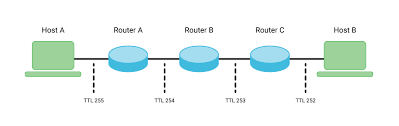
Advantages of TTL
- Prevents Infinite Loops: In IP networks, TTL is crucial for preventing packets from circulating endlessly, which would consume network resources and lead to congestion. [3]
- Ensures Data Freshness: In DNS and caching, TTL helps ensure that users receive up-to-date information by forcing periodic refreshes of records and content. [2]
- Reduces Network Load: By allowing intermediate servers (like DNS resolvers or web proxies) to cache data, TTL reduces the number of requests that need to go all the way to the authoritative source, thereby lowering network traffic and server load. [4]
- Improves Performance: Caching data with a reasonable TTL can significantly speed up access times for frequently requested resources. [4]
- Facilitates Network Changes: When IP addresses or other configurations change, a low DNS TTL ensures that these changes propagate quickly across the internet.
Disadvantages of TTL
- Stale Data (High TTL): If the TTL is set too high, especially for DNS records, changes to the underlying data (e.g., an IP address change) will take a long time to propagate, leading to users being directed to old or incorrect resources. [5]
- Increased Load (Low TTL): Conversely, if the TTL is set too low, it can lead to an excessive number of requests to the authoritative source (e.g., DNS server or origin web server), increasing their load and potentially slowing down responses. [5]
- Complexity in Configuration: Determining the optimal TTL value requires careful consideration of the data's volatility, network topology, and performance requirements. Setting it incorrectly can have adverse effects.
- Cache Invalidation Challenges: While TTL helps with automatic invalidation, sometimes immediate invalidation is needed (e.g., for critical security updates), which TTL alone cannot provide without manual intervention or more sophisticated cache control mechanisms.
Authoritative Sources
- What is TTL (Time to Live)? [Cloudflare]↩
- DNS TTL (Time to Live) Explained. [DNSimple]↩
- IP Time to Live (TTL). [GeeksforGeeks]↩
- What is a CDN? [Amazon Web Services (AWS)]↩
- What is DNS TTL? [Kinsta]↩
«חזרה לאינדקס המונחים